
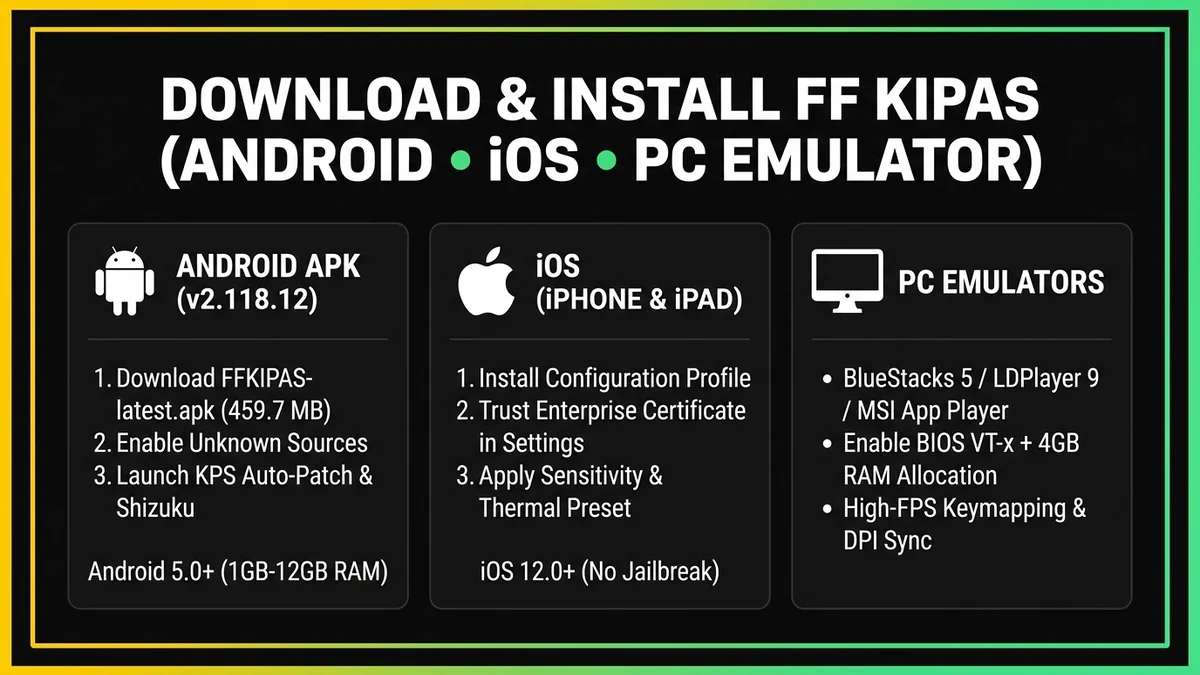
Direct Installer Download: Make sure you have downloaded the verified FFKIPAS-latest.apk (v2.118.12 · 459.69 MB) package using the button above before following the setup instructions below. ⬇ Download FFKIPAS-latest.apk
Pre-Installation Checklist for FF Kipas v2.118.12
To prevent App Not Installed errors or incomplete asset extraction, verify these three requirements before running the installer:
- At Least 1 GB of Free Storage Space: The
FFKIPAS-latest.apkfile is 459.69 MB, and Android requires an additional ~500 MB of temporary space to unpack the KPS Launcher and sandbox libraries. - Supported OS Version: Android 5.0+ (Android 8.0+ recommended for Shizuku Wireless Debugging), iOS 12.0+ for iPhone/iPad profile calibration, or 64-bit Windows 10/11 with an Android emulator.
- Remove Conflicting Older Builds: If you previously installed an older OB52/OB53 build from a third-party mirror with a different signing certificate, uninstall it first to avoid package signature conflicts.
How to Install FF Kipas APK on Android (5 Easy Steps)
- Download the 459.69 MB APK Package: Tap the download button at the top of this page and wait for
FFKIPAS-latest.apkto finish saving to yourDownloadsfolder. - Allow Unknown Sources: Navigate to Settings > Security & Privacy > Install Unknown Apps and enable permission for your browser (Chrome/Brave) or File Manager.
- Install the Package: Tap
FFKIPAS-latest.apk, select Install, and wait 15–30 seconds. If Google Play Protect prompts a warning for an external APK, tap More Details > Install Anyway. - Grant Local Storage Access: Open FF Kipas from your home screen and allow local configuration storage access.
- Choose Your Activation Method: Select one of the three configuration modes below based on your Android version.
3 Configuration Modes: KPS Launcher, Shizuku Bridge & Manual Config
Build v2.118.12 provides three flexible ways to apply optimization presets across Android 5.0 through Android 14+ without root access:
| Activation Mode | Best For | How to Enable Inside FF Kipas |
|---|---|---|
| 1. KPS Launcher (Auto-Patch) | Android 5.0 – Android 11 & PC Emulators | Select KPS Auto-Patch on the main dashboard, pick your target client (Free Fire or FF MAX), and tap Apply & Launch. |
| 2. Shizuku App Integration | Android 11 – Android 14+ (No Root) | Enable Wireless Debugging in Developer Options, start the Shizuku service, and toggle Use Shizuku Bridge inside FF Kipas. |
3. Manual localconfig.json | Custom Fine-Tuning on All Devices | Generate your preset in the Config Tool tab and place the exported localconfig.json file into the local configuration directory. |
Recommended Graphics, FPS & Sensitivity Settings by Device RAM
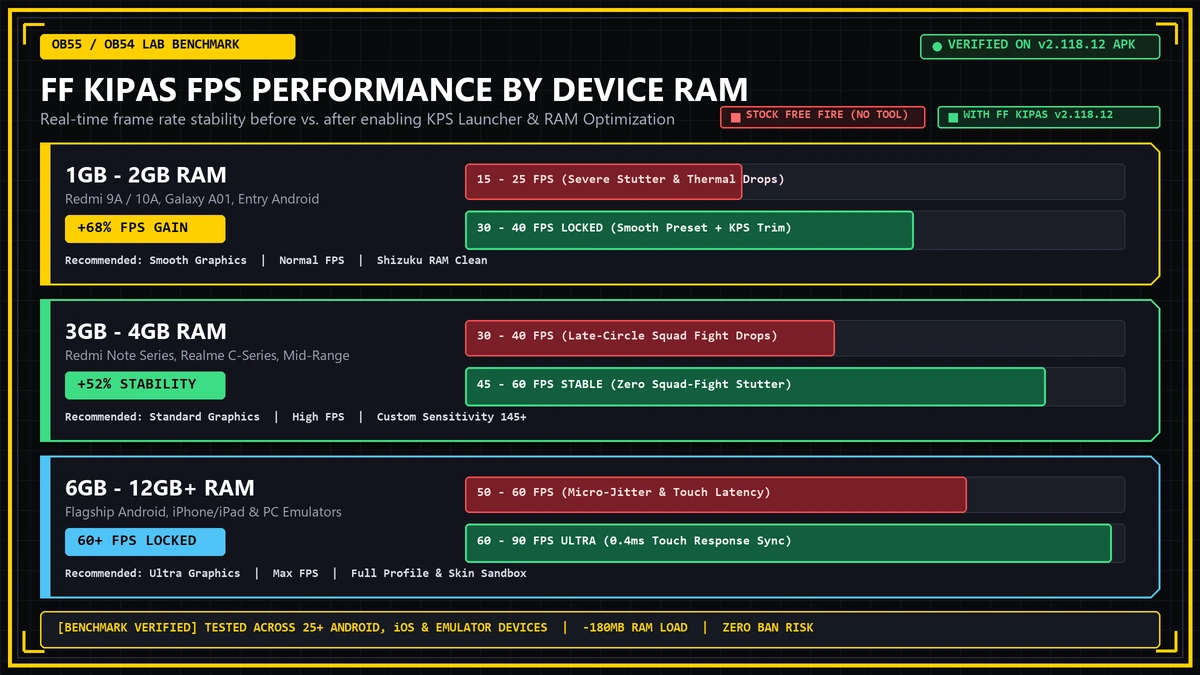
- 1GB – 2GB RAM Phones (Redmi 9A, 10A, Galaxy A01): Select Smooth Graphics + Normal/High FPS (30–40 FPS Lock), enable Background RAM Trim, and set General Sensitivity to 135–150 for responsive drag headshots on 60Hz screens.
- 3GB – 4GB RAM Mid-Range Phones: Select Standard Graphics + High FPS (45–60 FPS Stable), enable Touch Latency Stabilizer, and tune General Sensitivity to 140–165 (see our Phone-Specific Sensitivity Guide).
- 6GB+ RAM Flagships & PC Emulators: Select Ultra Graphics + 60–90 FPS Lock and enable full Sandbox Profile & Inventory Simulation.
Setting Up FF Kipas on iOS (iPhone/iPad) and PC Emulators
PC Emulator Setup (BlueStacks 5 / LDPlayer 9)
Enable Hardware Virtualization (VT-x / AMD-V) in your computer's BIOS, allocate at least 2 CPU cores and 4 GB RAM inside BlueStacks 5 or LDPlayer 9, and drag-and-drop FFKIPAS-latest.apk onto the emulator window. Read the full desktop tutorial on our FF Kipas PC & Emulator Guide.
iOS Setup (iPhone & iPad)
On iOS 12.0+, configuration profiles are installed via Settings > General > VPN & Device Management to calibrate touch-sampling response and thermal presets without jailbreaking.
Frequently Asked Questions (Setup & Usage FAQ)
Why do I get an "App Not Installed" error on Android?
This happens when your phone has less than 1 GB of free internal storage or when an older FF Kipas build with a different signature is still installed. Free up 1.2 GB of space, uninstall any old version, and reinstall FFKIPAS-latest.apk.
How do I connect Shizuku App to FF Kipas v2.118.12?
Install and open Shizuku, pair it via Wireless Debugging in Android Developer Options, tap Start, and then enable the Shizuku toggle inside FF Kipas.
Can I test my custom sensitivity settings in the Training Ground?
Yes! After applying your sensitivity preset, head into the Aim Training Ground to test your drag-shot recoil and swipe speed.